
A contractor estimate template helps you turn a measured scope into a client price you can explain. Keep quantities, private costs and selling amounts separate. Start with the public example below, then choose a file format and a worksheet for your trade.
A complete estimate names the job, work limits, quantities, selling price, tax treatment and next step. The private workbook holds costs and margin. The client file shows only the offer. Blank cost or tax fields mean the estimate is unfinished; an explicit zero records a decision that can be checked.
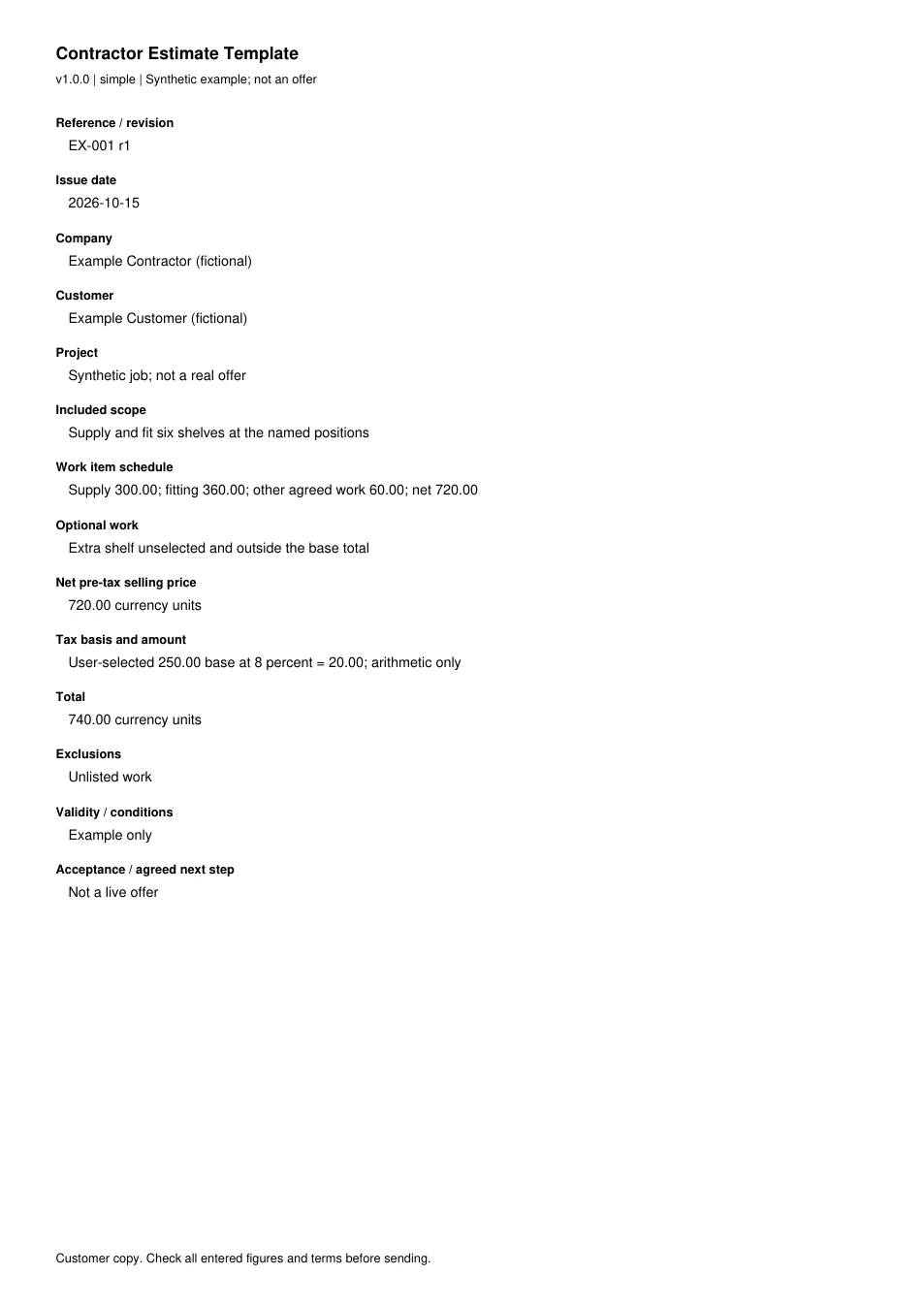
Contractor estimate template preview
This is a synthetic client estimate. The currency units and inputs are invented to show the maths. They are not local prices, recommended rates or tax advice. No client or completed job is represented here.
| Client field | Example value |
|---|---|
| Record id | EX-001, revision 1 |
| Prepared for | Example Client, made-up |
| Project | Supply and install the listed items |
| Scope basis | Written item list and agreed access |
| Net selling price before tax | 720.00 currency units |
| Tax | 20.00 on a user-chosen taxable amount of 250.00 |
| Total | 740.00 currency units |
| Exclusions | Work not listed in the agreed scope |
| Validity | User enters a real date and conditions |
| Acceptance | User defines the agreed next step |
A real estimate needs more than a total. Add enough scope detail to tell the client what they would receive. If the material, finish or quantity is undecided, name the open choice. A vague label such as “repairs” cannot explain why a price changed later.
The preview is readable without an account. Use it to decide if the format suits your work before entering client details into your own file. The signup form on this preview does not submit or collect details. The public instructions remain on hand to read.
What the editable pack contains
The original pack contains a private Excel costing workbook, separate client Word layouts and fillable PDF forms in Letter and A4 sizes. There are blank files and made-up examples. The simple layout is for a small, clear scope. The detailed layout gives each work item more space.
The phased layout adds a milestone schedule.
The workbook includes Inputs, Materials, Labor, Other Costs, Cost Summary, Sell Allocation, Milestones, Follow-up and customer preview tabs. A Read Me explains the entry rules. An Example tab records the arithmetic so you can compare a changed file with the original worked case.
The client preview tabs are still inside the private workbook. They are useful for checking what the client should see, but the whole workbook must stay private. Use a separate Word file or newly created PDF for the outgoing offer. A hidden tab is still part of the file.
You can import a private copy of the Excel file into Google Sheets and open a Word copy in Google Docs. These are file-import routes, not public master links. See the Sheets instructions and Docs instructions for the steps and checks. Check imported formulas before relying on a converted file.
Work through the contractor estimate template
The example begins with three included costs: ten goods units at twenty each, eight labour hours at thirty each and another included cost of sixty. Those line extensions are 200, 240 and 60. Together they make a direct cost of 500.
Add an indirect amount of 50 only if it has not already been included in a rate. That makes the cost basis 550. In this invented case a contingency of ten percent adds 55, bringing cost plus contingency to 605. A markup of twenty percent on 605 adds 121.
The selling price before discount is therefore 726.
A fixed client discount of 6 makes the net price before tax 720. The example user declares that 250 of that net selling amount is taxable and enters a rate of eight percent. Tax is 20. So the client total is 740.
This tax basis is an explicit example input, not a rule about materials or labour in any state.
If a payment of 200 has already been received, the first total stays 740. The balance is 540. Do not rewrite the estimate total to 540: that would lose the link between the offer and the payment record. A payment larger than the total produces an overpayment warning rather than an automatic zero balance.
The profit before tax in this example is 115 relative to the cost basis including contingency. Divide that 115 by the net selling price of 720 to find margin. The result is about 15.97 percent. That differs from the twenty percent markup because the two percentages use distinct bases, and the discount has reduced the selling price.
Enter the scope before the rates
Set out the deliverable in words a client can check. “Prepare and paint the listed walls with the chosen finish” is a starting point. Add the measured surfaces, preparation limits, coats, product choice and if ceilings or trim are included. Each trade worksheet asks for the fields that matter to that task.
Separate included work, optional work and exclusions. An optional patio clean should not enter the driveway-clean total until it is chosen. A condition you cannot inspect is not a known zero cost. Record the risk and explain how you will resolve it before you promise a final price.
Name the source of each amount. Use a drawing record ID, measured room schedule, counted item list or vendor quote. Include the date and revision so the next person can repeat the math. When a plan changes, update the takeoff and estimate together rather than editing the total by memory.
Field dictionary for a checked estimate
| Field | Entry rule | What to check |
|---|---|---|
| Company | Your real business identity | Do not use the made-up example name |
| Client | The client of this offer | Check spelling and agreed contact details |
| Project | Address or clear work record ID | Match the site and room to the scope |
| Record id | Stable estimate number plus revision | Keep prior sent versions |
| Issue date | The date you issue this version | Distinguish it from a site visit date |
| Currency | A named currency or unit | Use the same unit throughout |
| Amount | Measured or counted amount | Do not leave the unit implied |
| Unit cost | Your cost for that same unit | Convert pack prices before multiplying |
| Labour hours | Crew-hours or person-hours, labelled | Avoid mixing crew rate and individual hours |
| Inclusion | Clear Yes or No | Blank on an active line remains open |
| Indirect amount | Job costs outside the line rates | Check for duplicate overhead recovery |
| Contingency | Your recorded risk allowance | Explain what it covers |
| Markup | Percent used to cost plus contingency | Do not enter a desired margin as markup |
| Discount | Fixed amount off selling price | It cannot exceed the price |
| Taxable base | User-declared net selling amount | Apply the relevant rule after discount |
| Tax rate | User-supplied percent | Do not infer it from an address |
| Payments | Money already received | Reduce balance, not first total |
| Milestones | User-defined share of client total | Shares and amounts must match |
| Validity | Date and conditions for the offer | Check vendor expiry and open selections |
| Acceptance | What the client should do next | Match the needed agreement process |
Check units and rounding
Multiply amounts by rates expressed in the same unit. Square feet cannot be multiplied by a rate per square yard without conversion. A gallon, a five-gallon container and a litre are also distinct units. Write the unit beside both the amount and the price so the mismatch is visible.
The workbook rounds each line extension to two decimal places. It then sums the included extensions. It uses clear rounding for contingency, markup and tax too. This is a stated workbook rule.
Your contract or billing rules may require a different treatment. Do not change one formula without reviewing the related totals.
For selling-line allocation, the workbook spreads the indirect amount, contingency and markup in proportion to included direct costs. The last positive line carries the cent remainder. The same approach spreads a fixed discount over selling lines. That makes the allocated lines add back to the exact whole-job amount.
When direct cost is clearly zero, pro rata allocation has no useful denominator. The workbook uses a separate lump-sum selling line instead. An empty direct-cost input is a distinct state and stays open. A zero net selling price also makes margin undefined rather than zero percent.
The rounding rule was checked against Microsoft ROUND and Google Sheets ROUND. The scope, basis note and update method draws on the GAO cost guide. These sources support the method, not the invented example prices. Checked 15 October.
Full revision date is shown above.
Review a changed job
Change one input at a time when you check a new job copy. If the goods count rises, the cost line should rise too. If an item becomes optional, mark it No and check that it leaves the included sum. If you remove a line, look at the total and the last selling line.
Write a short note beside a changed scope. Keep the old sent file. The new file needs its own revision even if the final price stays the same. This makes it clear which work the client saw and which work you have only priced in a draft.
Choose the format you can maintain
Use the Excel estimate file when you want local cost formulas and a working audit trail. Use Google Sheets when you need your own shared working copy. Limit access to people who should see private costs.
Use Word or Google Docs for flexible scope text. Those totals are manual, so transfer checked selling amounts from your costing. Use the PDF form for a consistent fillable or printable layout.
Do not choose a format on appearance alone. Check if you need formulas, shared editing or a stable client copy. A spreadsheet is helpful for cost changes but risky to send whole. A PDF is stable for review but does not promise automatic math.
Find a worksheet for the job
The trade worksheet directory starts with roofing and links the complete trade set. It includes measured surface work, repairs, service visits and phased projects. Choose by the task you will price, not by the size of the example total.
For paint and coatings, use the painting worksheet. For a slab volume, use the concrete worksheet. A remodeling worksheet records room and phase allowances. A cleaning worksheet distinguishes an initial clean from recurring work.
Other trades have distinct unit risks. Windows may be counted by pane or unit. Lawn care may be per visit or season. A worksheet should name that billing basis.
It should not turn an area measurement into a fixed labour rate.
Estimate, bid, quote or invoice
Use an estimate to explain expected work and price on the stated basis. Use a bid proposal when responding to a defined invitation or package. Use a quote for an offer with scope, validity and acceptance terms. Their legal effects depend on wording and applicable rules.
Use an invoice to request payment for the stated billable work. Link it to the accepted record ID and any agreed changes. An invoice should not quietly become a new estimate because the job expanded. Record the changed scope before billing it.
If you are buying goods or subcontract work, a request for quote helps collect comparable prices. If you have several returned bids, use the tabulation sheet to keep first and adjusted totals separate.
Keep the client copy clean
Create a fresh client file. Include scope, agreed selling lines, tax, total, validity and the next step. Leave out vendor costs, cost rates, markup, margin, internal comments and other clients. Check file properties, comments and extra pages as well as the visible first page.
Open the final PDF or Word file on its own. Verify the record ID, revision, totals and attachments. Print preview on the real Letter or A4 setting before sending. A wide worksheet squeezed onto one page may technically fit while making the price unreadable.
When an app earns its place
Stay with the pack when a small number of jobs can be tracked reliably. An app may help when the same client and scope are retyped across estimates, approvals, scheduling and invoices. Compare the workflow you need rather than a feature count.
Start with the estimating software comparison. For work done from a phone, use the estimate app comparison. For billing after acceptance, use the invoicing comparison. Check the free-plan guide before confusing a trial with ongoing free use.
FAQ
Does the form choose prices for my area?
No. You enter the amounts, rates, tax basis and price basis notes. The worked numbers show arithmetic only. Vendor quotes and your own time records give a cost basis for a real job.
A template cannot know site access, goods choice or the scope you have not yet defined.
Can I keep private costs in a hidden tab?
Keep them in the private working file, but do not send that file to the client. Hidden tabs remain inside a workbook and can be restored. Create a separate client file with selling amounts only. Inspect the exported file, its comments and its extra pages before it leaves your control.
Are blank cells treated as zero?
Needed numeric inputs stay open until you enter a value. Enter zero only when you have decided that the amount or rate is zero. Optional lines marked No are excluded. A missing tax basis, a missing amount and a checked zero are distinct facts and should remain distinct in your records.
What should I check after changing a formula?
Run the synthetic example again. Then change one input you understand. Check the line extension, discount, tax, payment balance and milestone sum. Review zero and blank states apart.
Save the revised file under a new version so you can trace a later client file back to the costing that produced it.
Verdict on the contractor estimate template
Use the contractor estimate template to make the work and price traceable. Measure first, enter your own cost basis, resolve unknowns and create a separate client copy. Keep the public example as a check on the maths rather than a guide to what you should charge.